The free personal finance app, in your language and your currency
Import your bank statement and Moneydy sorts it, shows the bills coming up and forecasts your balance, with stock and crypto prices that refresh themselves.
"Can't I just use a spreadsheet?" You can. Here's the difference.
A spreadsheet stores numbers. Moneydy keeps them alive, and does the maintenance for you.
Your spreadsheet
Moneydy
Stock & crypto prices
Typed in by hand, stale by lunch
Refresh themselves with live quotes
Charts & reports
You build and fix every chart
Draw themselves as you spend
Staying on budget
Re-check formulas at month-end
Each category counts down in real time
Where it lives
One file on one computer
Phone, tablet and laptop, always in sync
Getting started
Starts empty, stays manual
Import your bank's CSV or Excel export, or paste it from online banking; rules sort it into categories
Rent, salary, subscriptions
Copied into every month by hand
Set up once, recorded on the day, shown 30 days ahead
Money for the weeks ahead
A guess, if you do the maths
Forecast day by day from your bills and usual spending
Knowing when to act
You remember to check. Or you don't.
Sentinel's price alerts check your targets every hour
And unlike bank-sync apps: no bank login, ever. You decide what goes in, and your data stays yours.
New
Less typing. Nothing forgotten.
Bring in your bank's export and Moneydy does the tidying: categories, duplicates, transfers and the bills that come back every month.
Smart import
Copy it from online banking. Paste. Sorted.
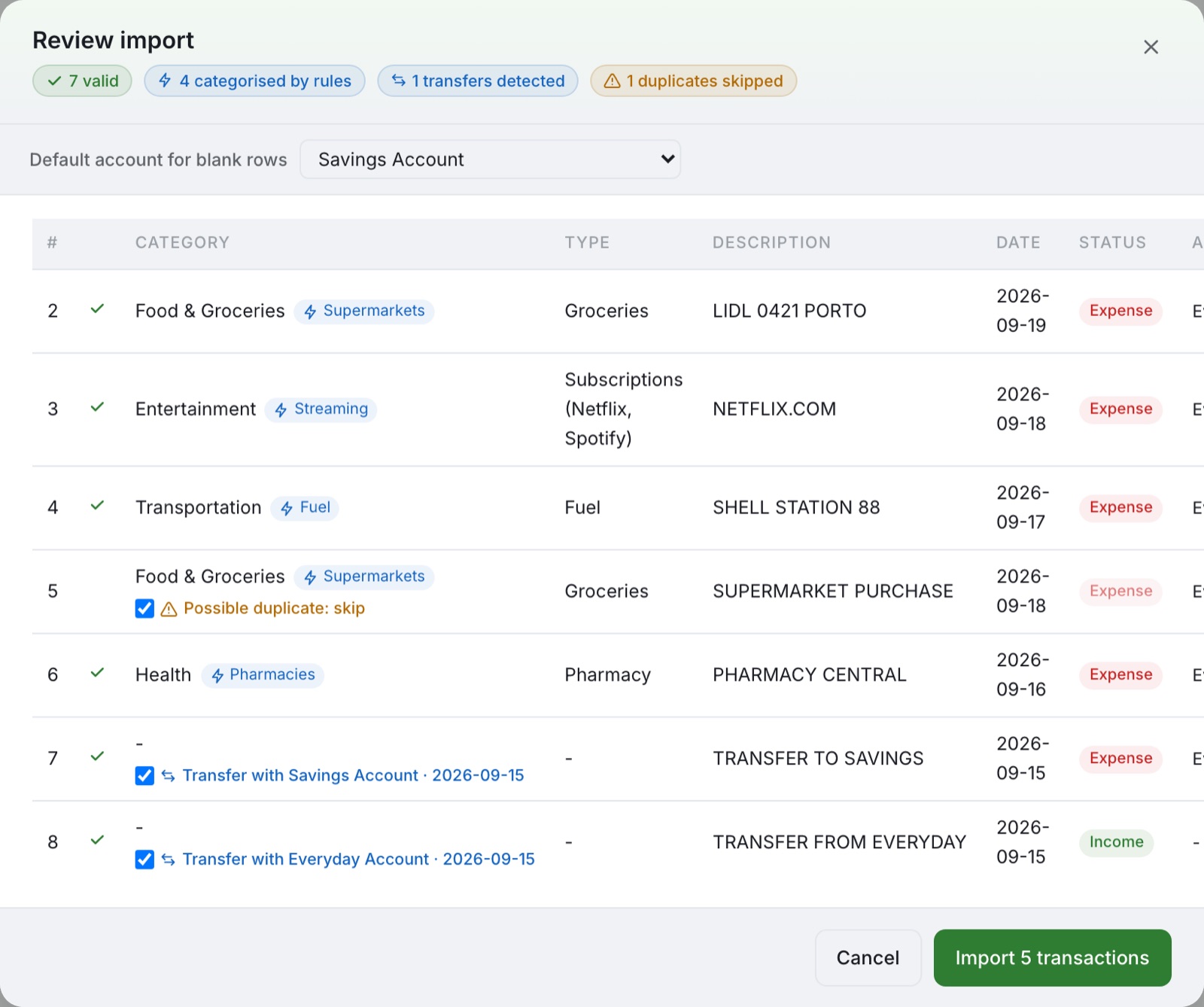
No file needed: select the transactions on your bank's website, copy them and paste them into Moneydy. Or drop in the CSV or Excel export. Moneydy finds the date and amount columns on its own, your rules pick the category, and you review every line before anything is saved.
1Copythe transactions in online banking
2Pastethem into Moneydy
3Revieweach line, then save
More detail
Column names from Portuguese, English and Spanish banks are recognised, including separate debit and credit columns
Lines you've already recorded are flagged as possible duplicates, so you can skip them with one click
Money moved between two of your accounts becomes one transfer, not an expense plus an income
Up to 1,000 lines per file. Or use our template if your bank exports something unusual.
app.moneydy.com/transactions
Rules
Categorise a merchant once, never again
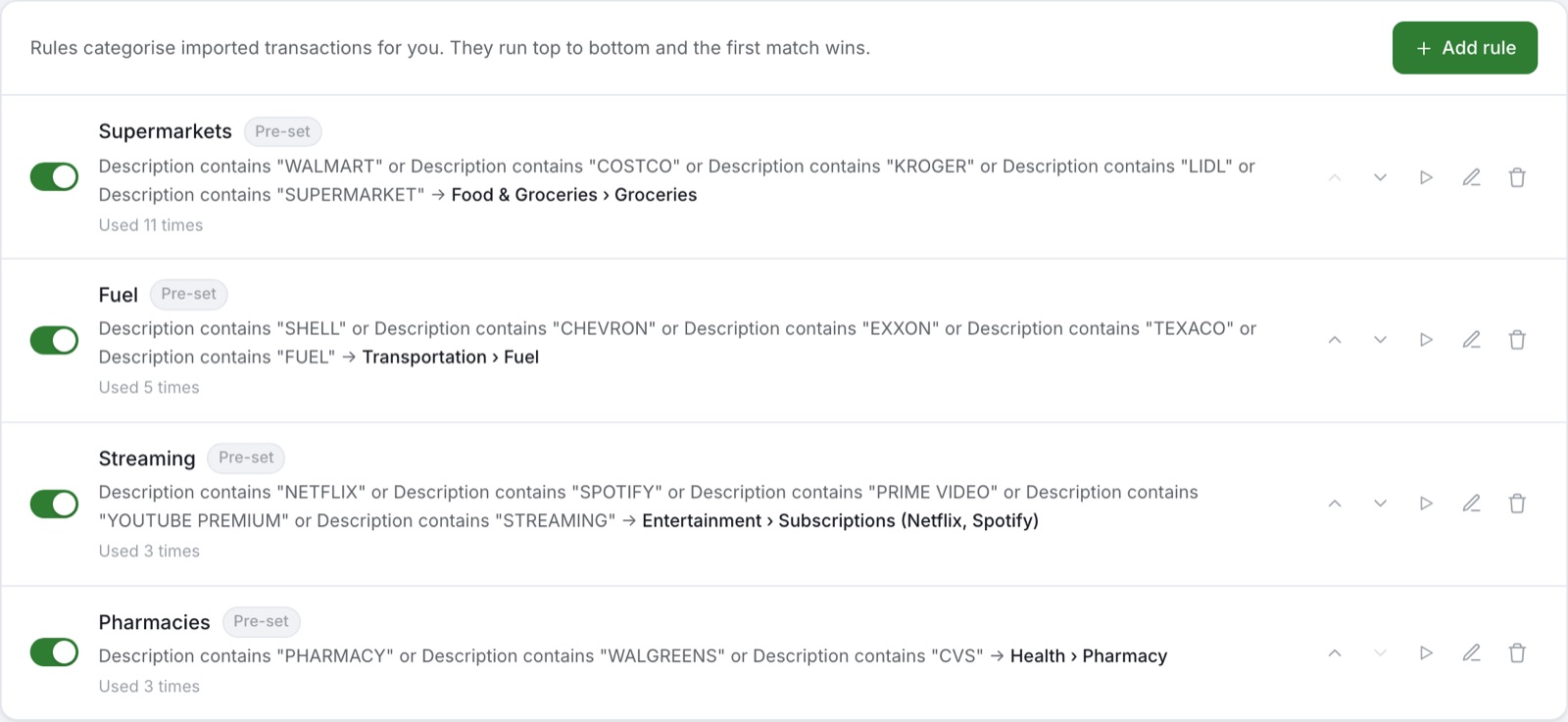
Tell Moneydy that anything containing "PINGO DOCE" is groceries and every future import follows. New accounts start with pre-set rules for common supermarkets, fuel, streaming and pharmacies.
More detail
Match on description, amount, type or account, with up to 5 conditions
Fix a category while importing and save it as a rule on the spot
Apply a rule to past transactions, with a preview before anything changes
app.moneydy.com/categories
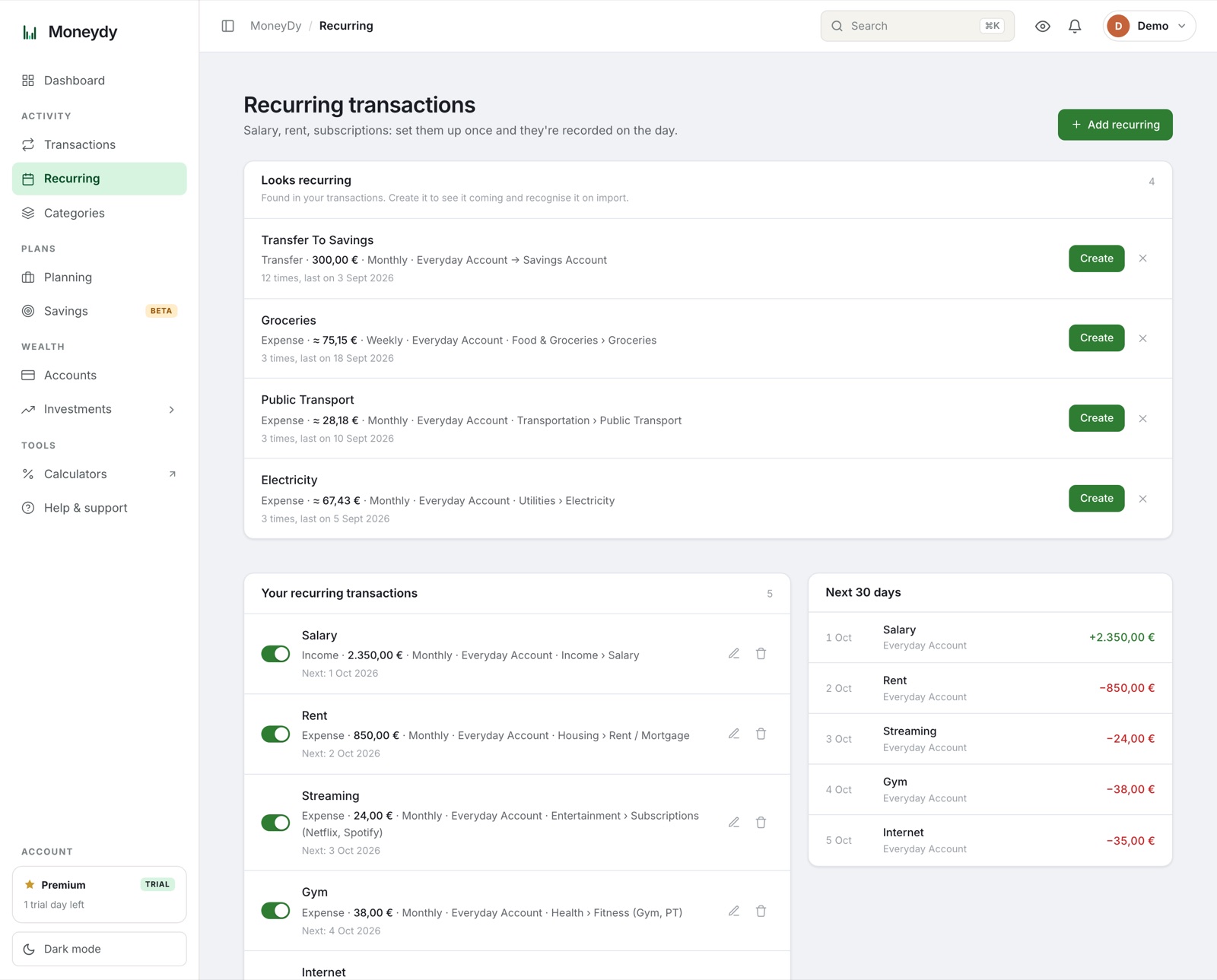
Recurring
See this month's bills before they land
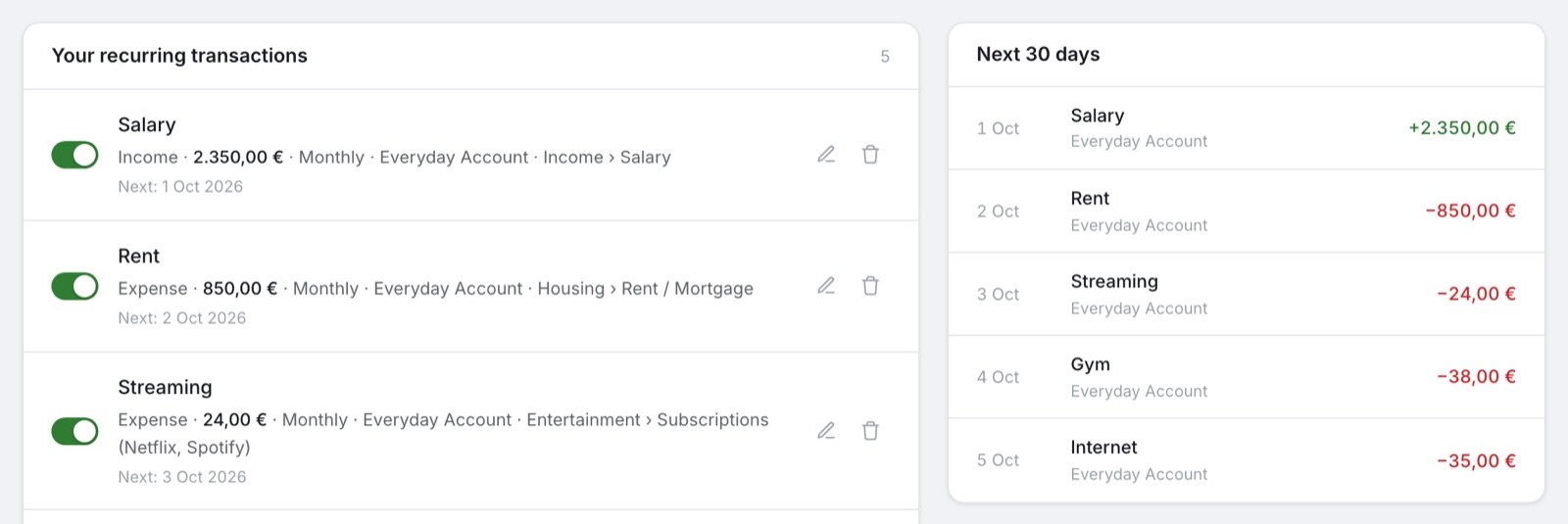
Salary, rent, subscriptions: set them up once. Moneydy records each one on the day, or waits for you to confirm, and the dashboard shows what's coming in the next 30 days.
More detail
Weekly, monthly or yearly, moved to Friday or Monday when it falls on a weekend
"Looks recurring" spots payments that repeat in your history and offers to set them up
On import, the statement line is matched to its recurring transaction instead of being added twice
app.moneydy.com/recurring
New
Know what's left. See what's coming.
Moneydy looks ahead as well as back: a limit for each category you care about, and your balance day by day for the weeks to come.
Category budgets
A limit for the categories that run away
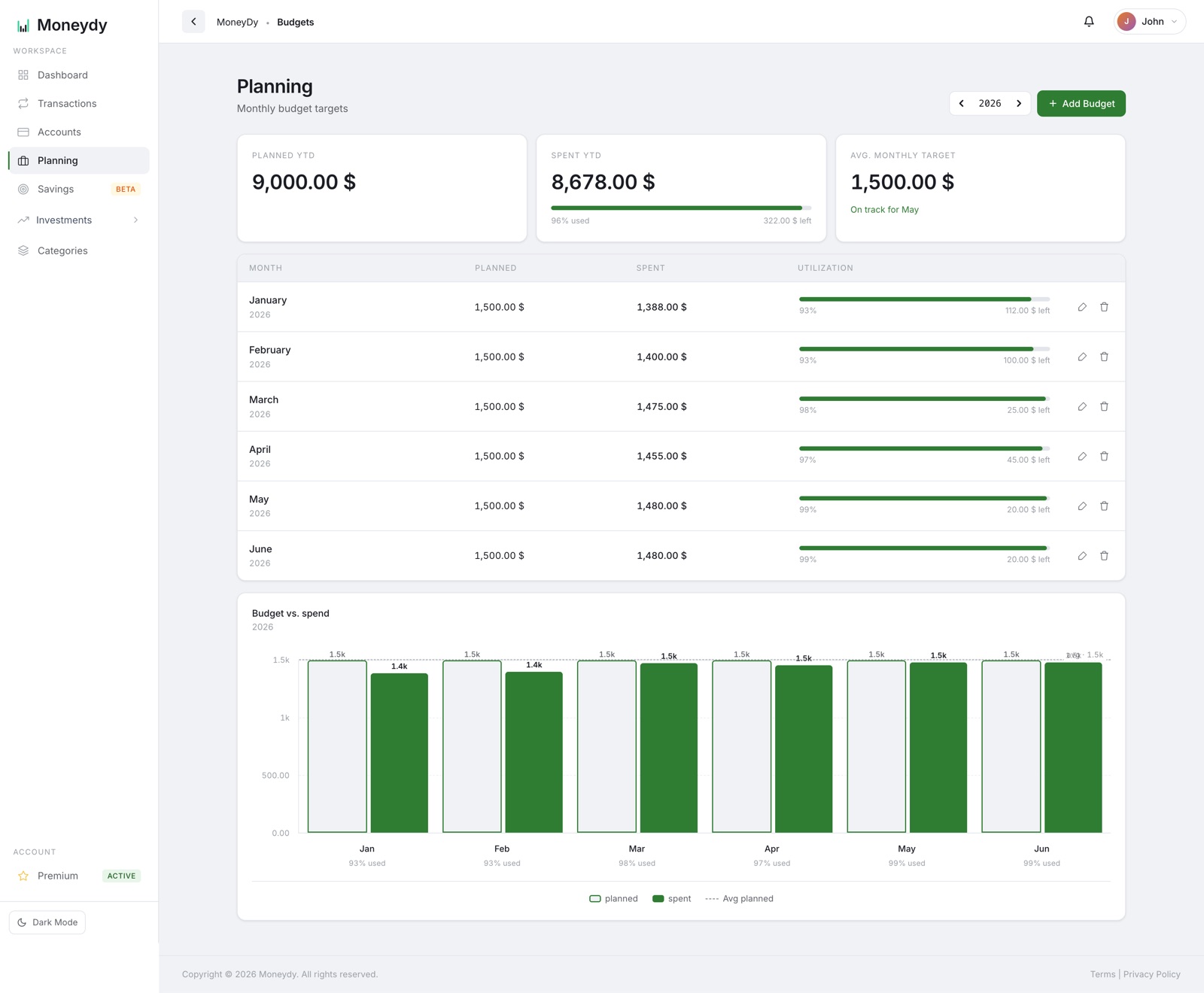
Give groceries, eating out or anything else its own monthly limit. It repeats every month until you end it, and every expense counts it down on the Planning page.
More detail
Bars turn amber at 80% and red at 100%, with a notification at both and an email when a category goes over
Raise a limit from next month and the months before keep the old one, so past months still add up
Spending in categories without a budget is shown too, and you're warned if the limits add up to more than your monthly budget
The Free plan includes 3 categories with a budget.
app.moneydy.com/budgets
By category
Groceries62%
Eating out84%
Entertainment107%
Transport35%
Also shown: spending without a budget
Balance forecast
Will the money last the month?
The dashboard projects your bank and cash balance day by day from today: transactions you've dated ahead, your recurring bills and income, and what you usually spend on everyday things.
More detail
See the lowest point ahead and the first day the balance would go below zero
If you have recurring income and your balance is heading below zero in the next 14 days, you get a notification and an email
Choose which accounts count: bank and cash by default, savings with one tap
An estimate, not a promise: irregular income isn't counted. 30 days ahead on the Free plan, up to 90 on Premium.
app.moneydy.com/dashboard
Balance forecast30d60d90d
BankCashSavings
IRS sem dores de cabeça.
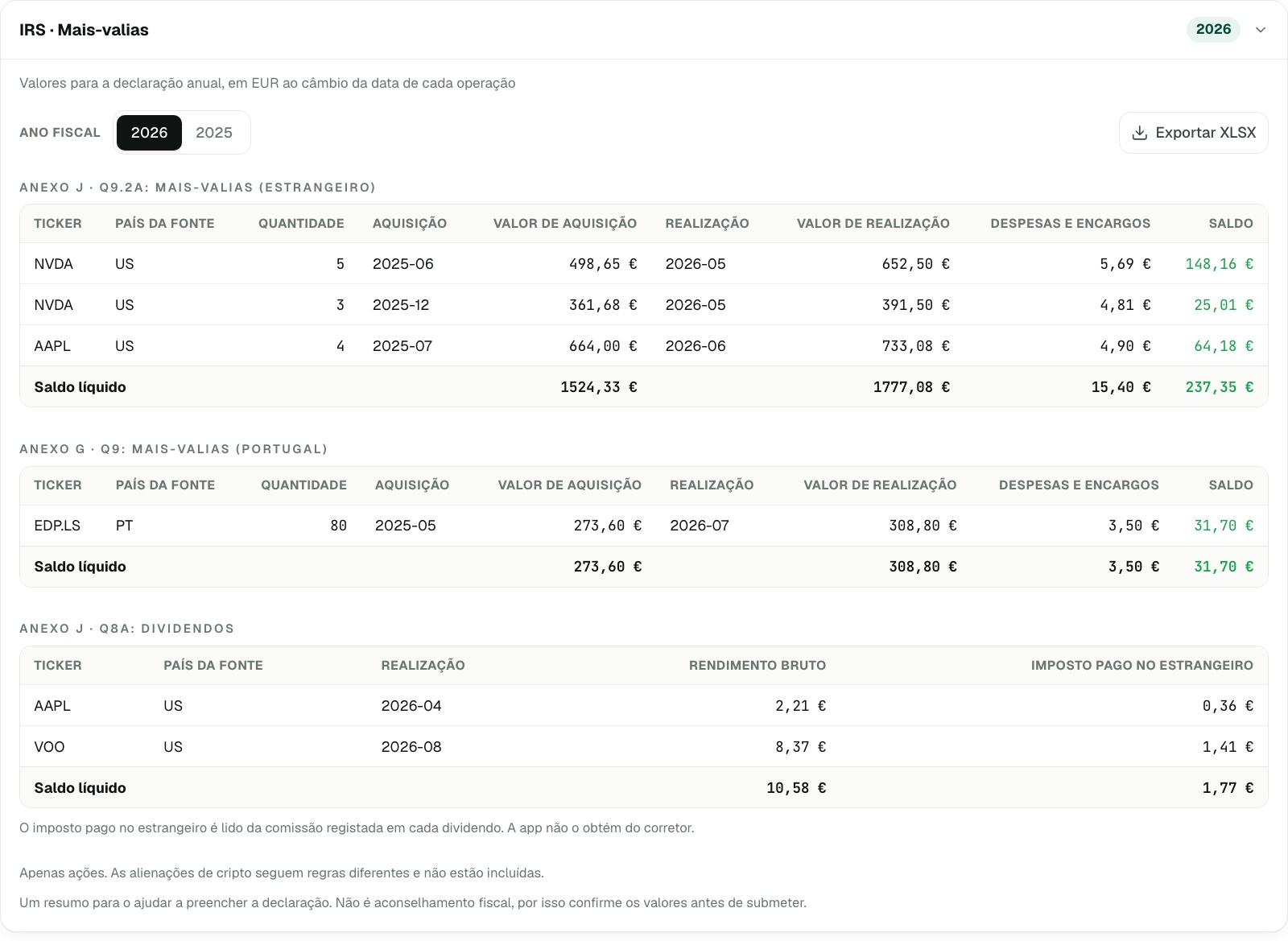
Your capital gains and dividends already laid out by the boxes on the Portuguese IRS return, crypto included, with no midnight spreadsheet on 30 June.
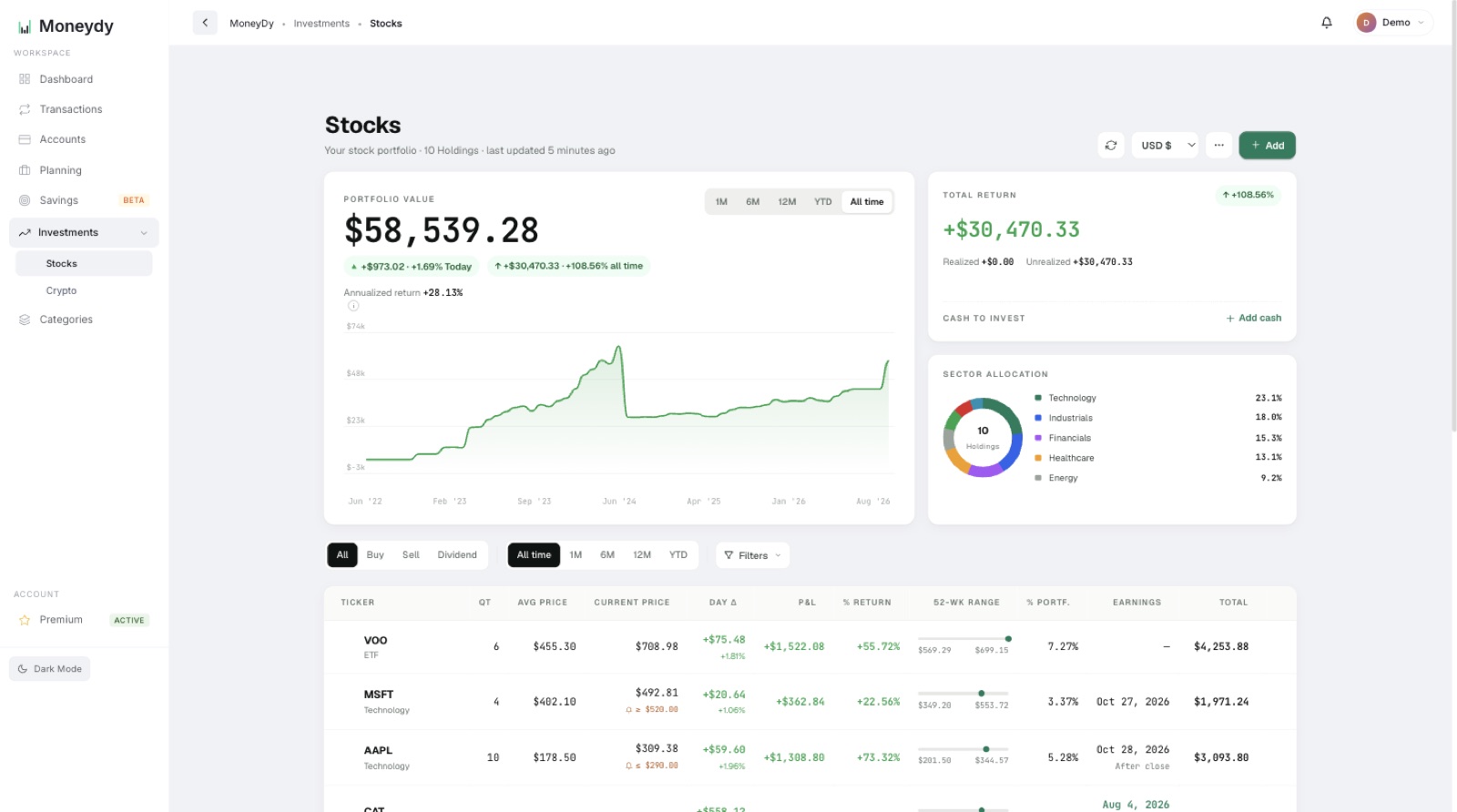
app.moneydy.com/investments/stocks
The 2, 5 and 8-year discount
Every sale is matched against its purchases, oldest first, and each line shows its long-term discount: 10% of the gain off after 2 years, 20% at 5, 30% at 8. Shares about to move up a step are listed, with the date.
Converted at the transaction-date rate
Bought in dollars and sold months later? Each leg is converted at the rate of its own day, in euros, not at today's rate, which would give a different number.
Anexo J and Anexo G, ready
Acquisition value, disposal value, expenses and source country, kept apart the way the form asks. Dividends under Q8A. Exports to Excel.
Crypto: the 365-day rule
Held a year or more: exempt, declared in Anexo G1. Less than that: 28% on the year's balance. Every coin you still hold shows the day it turns exempt.
Stocks export to Excel; crypto is an on-screen summary. Not tax advice: check the figures before you submit.
Your mortgage, no surprises.
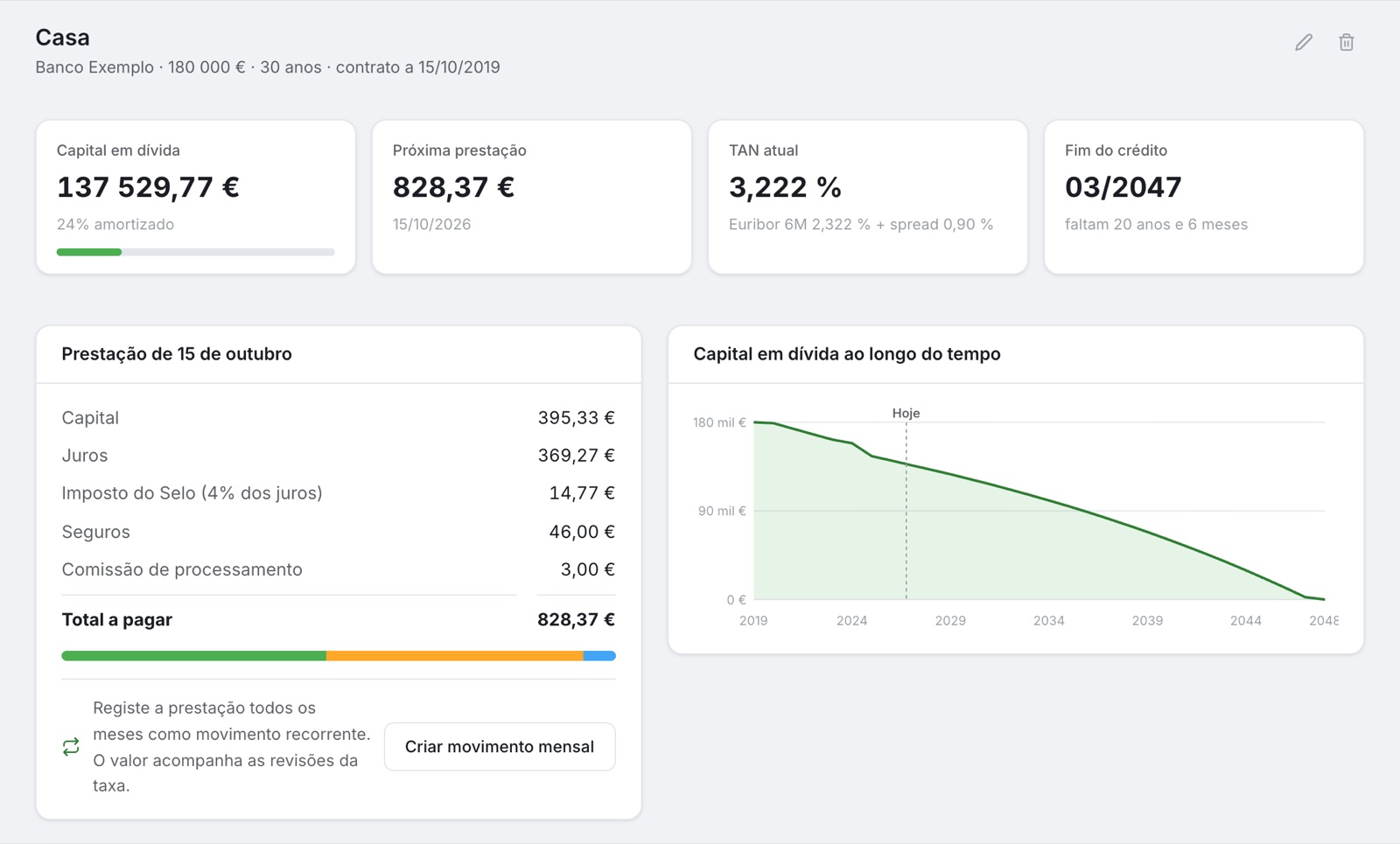
Add your Portuguese home loan and Moneydy rebuilds the schedule with the Euribor of every revision, Imposto do Selo included. What you still owe counts against your net worth.
app.moneydy.com/mortgage
Every Euribor revision
3, 6 or 12-month Euribor, revised against the previous month's average published by the ECB. Instalment, interest and balance for every month until the last one.
Warned before it changes
As soon as the Euribor for your next revision is out, you know the new instalment, before you pay it. And a heads-up when a mixed rate's fixed period is about to end.
Repay: shorter term or lower instalment?
Simulate an early repayment both ways: interest saved, months off, the new instalment and the fee. Record it and the schedule is rebuilt.
Decisions, with your numbers
Is switching banks worth it? Repay or invest? A plan of regular repayments? Compared on your own loan, with Euribor scenarios. Premium plan.
Loans in euros, under Portuguese rules. One mortgage on the free plan. Not financial advice.
Free Calculators
Plan ahead without an account: see what compound interest does to your savings, when you could reach financial independence, and what your dividends pay.
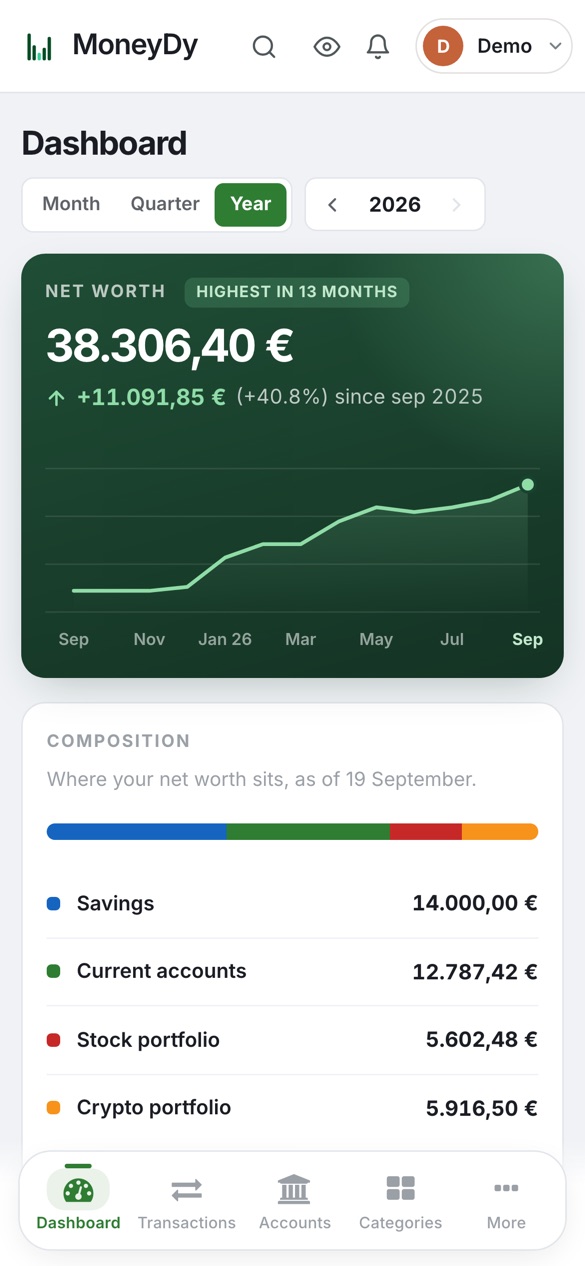
The app also tracks your net worth month by month, savings goals that follow their account, passive income (interest, dividends, rent) and amounts in euros, dollars or reais, in English or Portuguese.
See the full picture at a glance
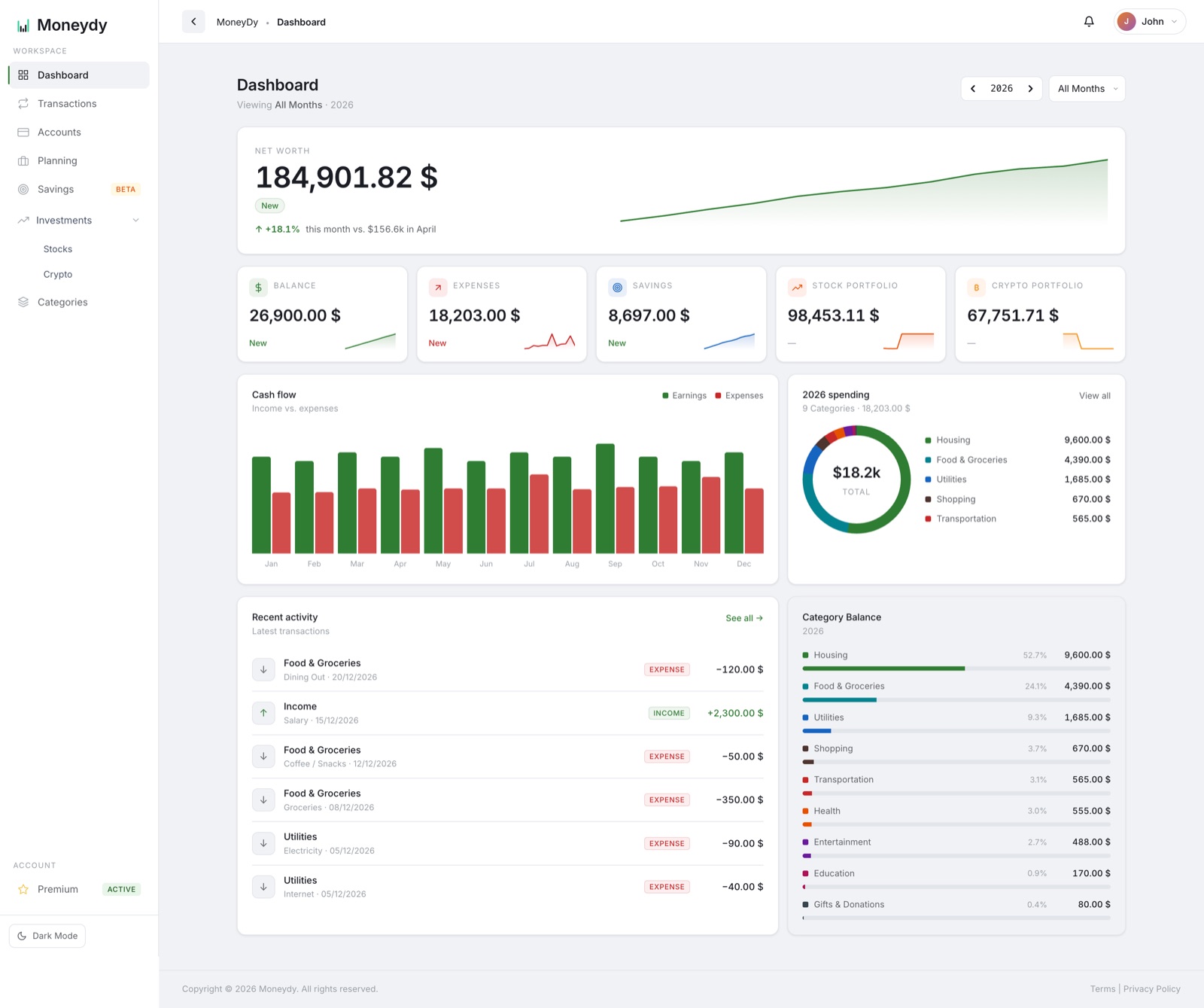
This is what your money looks like after one import: every screen below answers a question you're already asking.
app.moneydy.com/dashboard
"Where do I stand?" Income, spending, what's left and where it went, on one screen.
"Can I still spend this month?" Your budget counts down with every expense.
"What's about to leave my account?" Salary, rent and subscriptions for the next 30 days.
app.moneydy.com
From spreadsheet to living dashboard: one import, 20 seconds.
Don't take screenshots' word for it
Open the live demo: a real account pre-filled with three months of sample data. No signup, no email, nothing to type. See exactly what you'd get before you enter a single number.
Free plan with no time limit. Premium is €2.99 a month or €19.99 a year ($2.99 / $19.99; R$ 14.99 / R$ 99.99), and every new account gets 14 days of Premium without a credit card.
Free plan
Up to 30 transactions a month, 2 accounts, 12 monthly budgets, 3 category budgets, 3 recurring transactions, 3 rules and 3 investments. Statement import is included.
Bank connection
None, on purpose. Moneydy never asks for a bank or broker login, so it works with any bank that exports a statement or lists your transactions online.
How transactions get in
The CSV or Excel statement from your bank, or the transactions copied from its website and pasted, categorised by rules you control, with duplicates and transfers flagged before saving. Or by hand, also from a Portuguese invoice's QR code. Trading 212, Revolut, XTB and DEGIRO exports for investments.
Currencies and languages
Euros, US dollars or Brazilian reais. English or Portuguese.
Investments
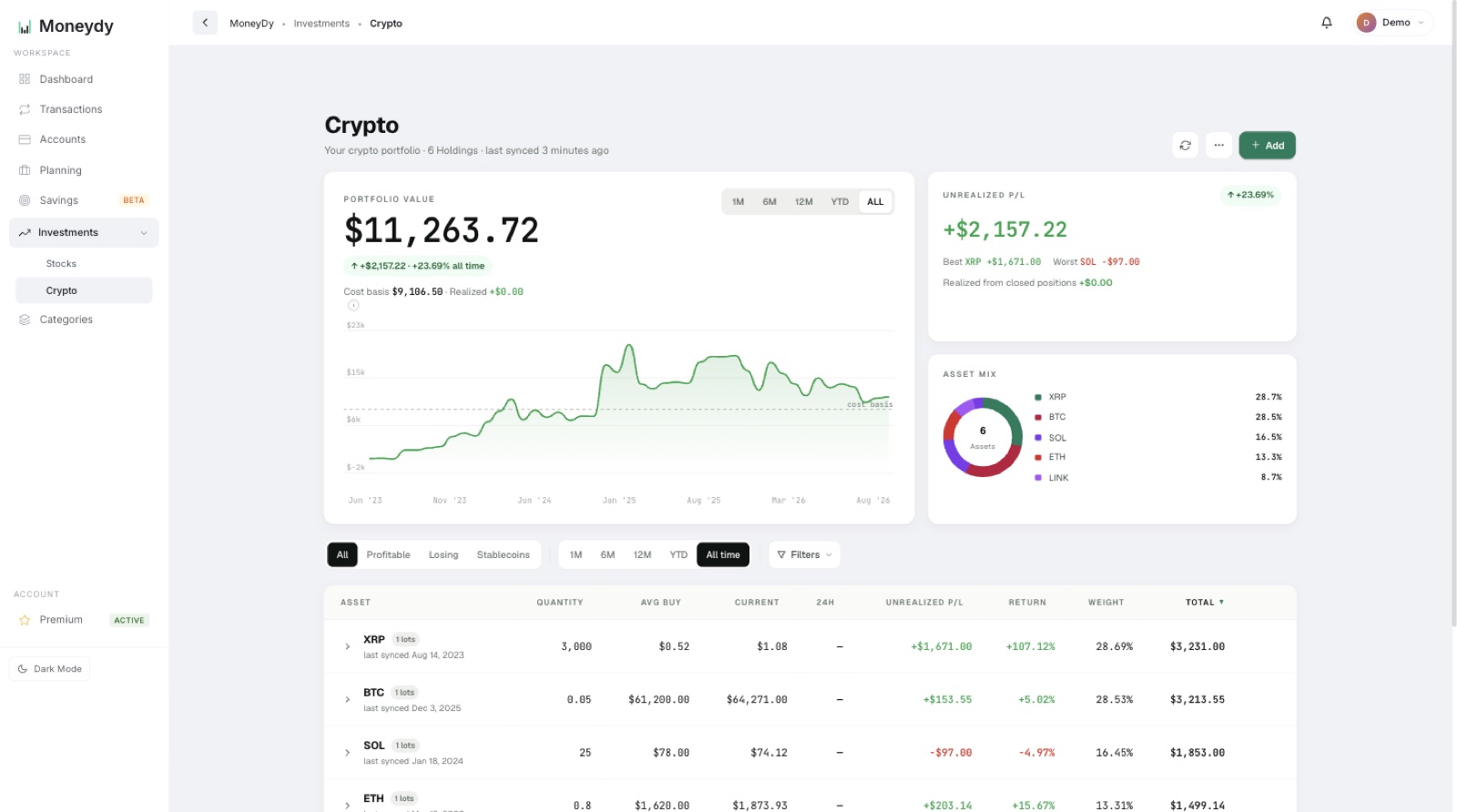
Stocks and crypto with prices that refresh themselves, returns and dividends, next to your spending.
For Portugal
A capital gains report for the IRS return (Anexo J, G and G1, sales matched first in, first out) and a mortgage tracker with up-to-date Euribor.
Where it runs
In the browser on your phone and computer, with the same data, and it can be installed to the home screen. No native iOS or Android app.
Your data
Run from Porto, Portugal, under the EU GDPR. Deleting your account deletes all its data.
Try it
A live demo account with sample data, no sign-up, deleted after 24 hours.
Questions, answered.
What people ask us before they sign up.
Do you connect to my bank or broker?
No. Moneydy never asks for a bank or broker login. You add entries by hand, import the CSV or Excel file your bank already lets you export, or copy the transactions from your bank's website and paste them.
Which banks and brokers does it work with?
Any of them. There is no integration to break: export your statement as CSV or Excel and import it, or copy the transactions on your bank's website and paste them. Moneydy recognises the usual column names, and our template covers anything unusual. Trading 212, Revolut, XTB and DEGIRO exports are read as they come. From then on, stock and crypto prices refresh themselves.
Can it categorise my transactions automatically?
Yes, with rules you control. New accounts come with pre-set rules for common merchants, and you can add your own (3 on the Free plan; pre-set rules don't count). Rules run on every import, and you can apply one to the transactions you already have.
Does it handle recurring bills like rent and subscriptions?
Yes. Set up your salary, rent or a subscription once and Moneydy records it on the day, or waits for you to confirm. The dashboard shows what is due in the next 30 days. The Free plan includes 3 recurring transactions.
Can I set a budget for each category?
Yes. Give groceries, eating out or any other category its own monthly limit; it repeats every month until you end it. Moneydy warns you at 80% and at 100%, and emails you when a category goes over. The Free plan includes 3 categories with a budget.
Can it tell me if I'm about to run short?
It forecasts it. The dashboard projects your bank and cash balance day by day from today, using transactions you've dated ahead, your recurring bills and income, and your usual everyday spending. If you have recurring income and the balance is heading below zero in the next 14 days, you get a notification and an email. Irregular income isn't counted, so it errs on the low side. 30 days ahead on the Free plan, up to 90 on Premium.
Is it really free?
Yes. The Free plan has no time limit (up to 30 transactions a month, 2 accounts and 3 investments). Every new account also gets 14 days of Premium, with no credit card.
What happens when the 14-day trial ends?
Nothing is charged, because we never asked for a card. You move to the Free plan automatically and everything you entered stays; the limits only apply to new entries.
Does it work outside Portugal?
Yes. Moneydy works in English or Portuguese, in euros, dollars or reais. The only Portugal-specific part is the IRS report for stocks.
Can I delete my account and my data?
Yes, anytime, from your profile page. Your account and every transaction, account, budget and investment are permanently deleted.
Can I try it before signing up?
Yes. The live demo is a real account pre-filled with sample data. No email, nothing to type.Open the demo →